^^ Fingers crossed that third party manufacturer gets it right cause there's been over a year of radio silence from this project: https://www.instagram.com/centuryxtremelens/
My xtreme got stolen in 2019, and I was dumb enough to pass on the opportunity to buy a slightly scuffed one for $1500 afterwards 
Since then I've just been using the opteka and stretching it in AE using the Optics Compensation effect–– hopefully some of you can find this technique useful
original (HPX171, 62mm fisheye with 62-72 step-up ring):

export:

AE settings for 1080p30 footage:

^these settings are the best i've found – the image gets a bit softer but that can be fixed with some Sharpen effect in premiere.
example footage:
https://www.thrashermagazine.com/articles/videos/sean-christiansen-s-hel-katt-video/
Hi guys,
Since I got inspired by this post, I figured I would share my setup, maybe it can help someone:
-Decided I would try my old 72mm Opteka on my HMC150 with the help of a step down ring (72mm -> 62mm)

-Zoom in camera is set to Z11.
-I then tweak some settings in Da Vinci with a powergrade (so clip can be ready in seconds. Powergrade file is attached) + some extra sharpening on the sides (with a quick mask. You can add more sharpness with the 3rd node)


Here is the result (you can even add some Da Vinci AI upscaling if you fancy it):
https://youtu.be/DrDc7k-mrCs?si=36flxdiv-9jbNY-3Of course it's still not an Xtreme, chromatic aberrations are clearly visible on some footages, sides are pretty soft but it does the job for me.
Oh! And I asked a friend of mine to 3d print me a screen cover that helps me know what will be cropped in post
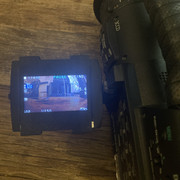
Let me know if I can help!

 Topic: century xtreme revival? (Read 9822 times)